
IBB product · Business Central add-on
Dynamics 365 Business Central Employee Expenses
Simplify the submission, revision and payment of expenses with Employee Expenses, an add-on for Dynamics 365 Business Central.
01What it does
Expenses, handled inside Business Central.
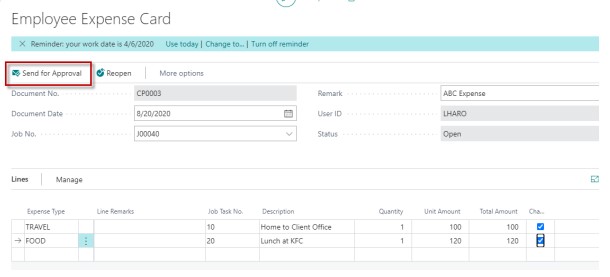
Employee Expenses lets your people submit, revise, approve and pay expenses within Business Central.
Business Central's financial management connects accounting, sales, purchasing, inventory and customer interactions, for an end-to-end view of your business. Employee Expenses takes this one step further, with easy configuration and automation where you want it.
If you are tired of paying expenses by hand and want a simple, cost-effective solution, Employee Expenses from IBB Innovations is for you.
- 01Submit
- 02Revise
- 03Approve
- 04Pay

02How it works
From expense type to reimbursement.
Real screens from the Business Central CRONUS demo company.
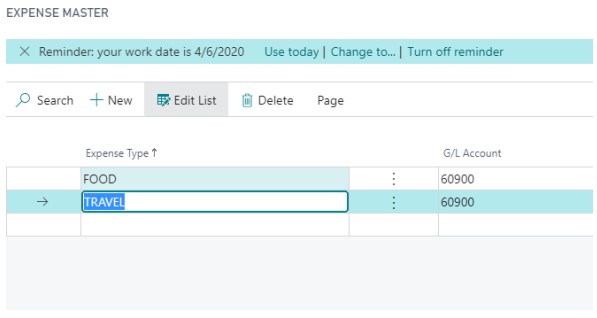
Set up expense types
The Expense Master holds your expense types, such as food and travel, each with its own G/L account.
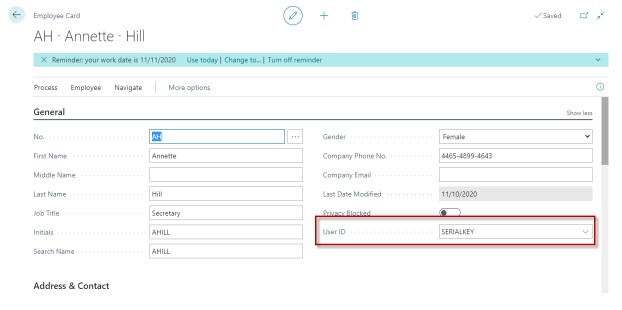
Connect each employee
The employee card carries the employee’s Business Central user ID.
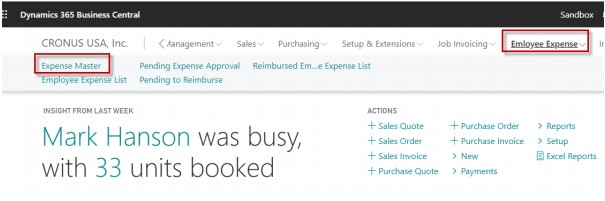
Approve and reimburse
The Employee Expense menu: expense list, pending approvals, expenses pending reimbursement and the reimbursed expense list.
Contact
Ask about Employee Expenses.
Tell us how your team handles expenses in Business Central today. We reply within one business day.
- Visit
- 1201 N Watson Rd, Ste 100C
Arlington, TX 76006 - Hours
- Monday to Friday, 8:00 AM to 5:00 PM
Tell us about your business
Takes about two minutes. We reply within one business day.
Thanks, we have your message.
We will reply within one business day. If it is urgent, call +1 (833) 789-1551.